
Best Taxi Apps in Korea for Tourists: k.ride vs Uber (2026)

If you’re visiting South Korea for the first time, choosing the right taxi apps in Korea can make getting around much easier. You do not need to download every Korean taxi app before your trip.
Which taxi apps should you download for Korea?
Designed for international travelers with foreign-card payment, multilingual destination search, and translated driver chat.
Useful if you already have an Uber account and payment method set up. Keep it installed in case matching is easier on one app than the other.
Create your accounts, add your payment method, enable location access, and save your hotel before arriving in Korea.
Place the pickup pin at an exact entrance, subway exit, hotel driveway, or another spot where the driver can actually stop.
In this guide

Which Taxi Apps Should Foreign Tourists Download?
You do not need five taxi apps for a trip to Korea. For most first-time visitors, I would keep it simple: use k.ride as your primary taxi app and keep Uber as a backup.
1. k.ride — My First Choice for Tourists
k.ride is operated by Kakao Mobility, the company behind Korea’s Kakao T taxi platform, but the app is designed specifically for international travelers.
The biggest advantage is that you do not need to build your trip around a Korean account or Korean payment setup. Kakao Mobility says travelers can sign in using Google, Apple, or email and register eligible foreign-issued credit or debit cards.
The app also provides a multilingual interface, destination search and translated communication with drivers. You can check an estimated fare before requesting a taxi, which is useful when deciding whether a taxi is worth taking instead of the subway.
2. Uber — Keep It as Your Backup
If you already use Uber at home, do not delete it before your Korea trip. Uber Taxi operates in Korea, so your existing account gives you a useful second option without learning another unfamiliar app.
I would not necessarily use Uber instead of k.ride. I would keep both. If one app is taking too long to find a driver, has a payment problem, or does not show a suitable vehicle, you can quickly check the other.
3. Kakao T — Useful, but Not Essential for Most Short Trips
Kakao T is one of Korea’s main local mobility apps. It can be useful if you already use Kakao services or you are staying in Korea for a longer period.
For a typical one- or two-week vacation, however, I would not make Kakao T your only taxi option. k.ride was built to make account setup and payment easier for international visitors, so there is little reason to make your first trip more complicated than necessary.
k.ride vs Uber vs Kakao T
| App | Best Use | Why Tourists May Like It | Keep in Mind |
|---|---|---|---|
| k.ride | Primary app | Traveler-focused setup, foreign-card support, multilingual features and estimated fares. | You still need mobile data and a working payment method. |
| Uber | Backup | Familiar account and payment setup for travelers who already use Uber. | Availability can vary depending on location and time. |
| Kakao T | Optional extra | Popular local platform with multiple taxi categories. | Setup can be less convenient for a short-term foreign visitor. |
My setup: Install k.ride + Uber before your flight. For most first-time visitors, that gives you a simple primary option and an immediate backup without cluttering your phone with unnecessary apps.
Set Up Your Taxi Apps Before the Flight
Do not wait until you are standing outside Incheon Airport with your luggage to set everything up. Install the apps, create your accounts, and check your payment method while you still have reliable Wi-Fi and easy access to email or SMS verification.
It takes only a few minutes at home, but it can save a lot of frustration after a long flight.
10-Minute Taxi App Setup
- Install k.ride and Uber.
- Create both accounts while you can easily receive verification emails or messages.
- Add the credit or debit card you plan to use in Korea.
- Make sure your card allows overseas and online transactions.
- Allow location access while using the apps.
- Turn on notifications so you do not miss driver updates.
- Save your hotel’s name, address and main entrance.
- Have mobile data ready for your arrival day.
Make Sure You Have Mobile Data
Taxi apps depend on live location, map data, driver messages and booking updates. Airport Wi-Fi may help inside the terminal, but you do not want to lose your connection as soon as you walk outside.
If you have not arranged mobile data yet, see my Korea eSIM Guide for 2026 before your trip.
Save Your Hotel Before You Land
One of the easiest mistakes to make is searching for a broad neighborhood instead of an exact pickup or destination point.
For example, Myeongdong is an area—not a useful taxi pickup point. Your driver needs somewhere specific where the car can actually stop.
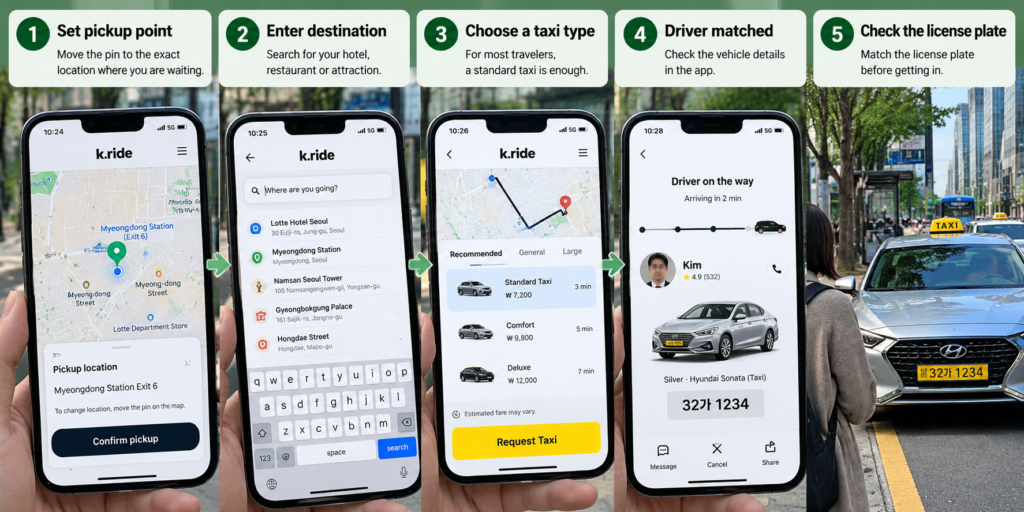
How to Book a Taxi in Korea
Once your account, payment method and mobile data are ready, booking a taxi is straightforward. The part I would pay the most attention to is not the app itself—it is choosing the right pickup point.
After a Driver Accepts Your Ride
Stay close to the pickup point and keep an eye on the app. In busy parts of Seoul, a driver may not be able to wait long at the curb.
If you are inside a large shopping mall, station or hotel, move toward the entrance you selected. When translated in-app messaging is available, use it rather than depending on a complicated phone conversation in English.
What About Incheon Airport?
You can use taxi apps in Korea, but I would not make the airport curb your first experiment with a new app.
After a long flight, with luggage and possible jet lag, an official airport taxi stand can be the simpler option. Once you are checked into your hotel and know that your apps and payment methods work, you can use them for the rest of your trip.
- Follow the pickup instructions shown in the app.
- Do not choose a random curb outside the terminal.
- Check the terminal and pickup location carefully.
- Confirm the license plate before loading your luggage.
- Keep mobile data active so you can receive driver messages.
If your hotel is in Myeongdong and you are still deciding how to leave the airport, see my Incheon Airport to Myeongdong guide . It compares the practical airport transport options before you decide whether a taxi makes sense.
Taxi Types, Fares and Payment
You may see several vehicle categories when booking a taxi in Korea. For most visitors, the choice is simpler than it looks: start with a standard taxi and move up only if your group or luggage actually needs more space.
Vehicle names and availability can vary by app, but these are the basic differences you should understand before booking.
| Type | Best For | What to Expect |
|---|---|---|
| Standard | Most travelers | The practical default for ordinary city rides. |
| Comfort / Minivan | Families, groups or extra luggage | More passenger and luggage space than a regular sedan. |
| Deluxe | Travelers wanting a higher-tier ride | A more premium taxi category than a standard ride. |
| Luxury | Premium travel | Higher-end vehicle options when available. |
Do not automatically choose the largest vehicle. If you are one or two travelers with ordinary luggage, start by checking the standard option. Larger or premium categories can cost more and may have different availability.
Check These 4 Things Before You Tap “Request”
Is the Estimated Fare the Final Price?
k.ride shows an estimated fare before you request a vehicle. Use that estimate to decide whether the taxi makes sense for your trip, but still review the final booking screen carefully.
Depending on the service and booking conditions, additional call-service charges or other clearly displayed fees may apply. Always check what the app shows before confirming rather than assuming the first number you see is the only possible charge.
For one person traveling during the day, the subway is often the more economical choice. A taxi becomes much more attractive when you are sharing the fare, carrying luggage, traveling late at night, dealing with rain, or going somewhere inconvenient by public transport.
What If No Driver Accepts Your Ride?
Do not keep pressing the request button without changing anything. First check whether your pickup point is actually easy for a driver to reach.
- Move the pickup pin to a larger road, hotel driveway, subway exit or nearby convenience store.
- Check the vehicle type. If you selected a large or premium vehicle, try a standard taxi instead.
- Open your backup app. Check Uber if k.ride is not finding a driver.
- Move away from difficult streets. A pedestrian lane, market alley or packed nightlife street may be difficult for a taxi to enter.
- Look for an official taxi rank. Major stations, airports and larger hotels often have designated taxi areas nearby.
Common Taxi App Mistakes to Avoid in Korea
Most taxi-app problems in Korea are easy to avoid. These are the mistakes I would watch for on a first trip.
Driver availability can change depending on the neighborhood, weather and time of day.
✓ Better: Keep both k.ride and Uber ready so you can quickly check another option if one app cannot find a driver.
“Myeongdong,” “Hongdae,” or “Gangnam” is far too broad. Your driver needs to know exactly where the car can stop.
✓ Better: Choose a hotel entrance, subway exit, convenience store or clear roadside landmark.
A driver may arrive while you are still inside a hotel, mall or station. On a busy road, the taxi may not be able to wait for long.
✓ Better: Move toward the pickup point as soon as a driver accepts your request and watch the vehicle’s location in the app.
Busy hotel entrances, stations and nightlife areas may have several taxis arriving at the same time.
✓ Better: Check the license plate and vehicle details in the app before getting in.
Some drivers may speak English, but you should not depend on it for directions or complicated pickup instructions.
✓ Better: Use the destination saved in the app and translated in-app messaging when available.
Taxi apps need data for your live location, driver messages and pickup updates. Public Wi-Fi is not something I would rely on once you start moving around the city.
✓ Better: Have an eSIM or another mobile data option working from your arrival day.
- Mobile data is working.
- The pickup pin is at the correct entrance.
- The destination is correct.
- Your payment method is ready.
- The license plate matches before you get in.
FAQ: Using Taxi Apps in Korea
What is the best taxi app for foreign tourists in Korea?
For most first-time visitors, I would start with k.ride. It is designed for international travelers and supports features such as multilingual destination search, translated communication and eligible foreign-issued cards. I would also keep Uber installed as a backup.
Do I need a Korean phone number to use a taxi app?
Not necessarily. k.ride is designed so international travelers can create an account without relying on the same Korean account setup that local apps may use. The important thing is to complete your account setup before your trip and make sure you have mobile data in Korea.
Can I use a foreign credit card?
k.ride supports eligible overseas-issued credit and debit cards. Add your card before flying and check that your bank allows overseas and online transactions.
Can I pay cash for a taxi in Korea?
Payment options can depend on how the ride is booked and the taxi service you select. If you book through an app, check the payment method shown on the booking screen before confirming the ride rather than assuming you can switch payment methods later.
Does Uber work in South Korea?
Yes. Uber Taxi operates in Korea. If you already use Uber at home, keeping your existing account installed gives you a useful backup when you need a taxi.
Do I need to tip taxi drivers in Korea?
Tipping is generally not expected for ordinary taxi rides in Korea. Pay the fare shown for your ride; you do not need to calculate an additional percentage tip.
What I Would Download Before Flying to Korea
If this is your first trip to Korea, keep it simple.
1. Install k.ride as your main taxi app.
2. Keep Uber as your backup.
3. Add your payment method before leaving home.
4. Set up mobile data before arrival.
5. Save your hotel and check the exact pickup point every time you book.
You probably will not need a taxi for every trip in Seoul. The subway is often faster and cheaper for ordinary sightseeing, while taxis become especially useful with luggage, late at night, during bad weather, or when your destination is awkward to reach by public transport.
If you are still getting comfortable with public transportation, my Seoul Subway Guide explains the basics for first-time visitors.
And if you have not arranged mobile data yet, read the Korea eSIM Guide before you fly.